Roll over image to zoom in · Click to see full view
Product information
From the manufacturer
About this product
- 8 x RJ-45 Gigabit Ethernet Ports with PoE+
- Cloud Managed with VigorACS
- 802.1q VLANs with Dynamic MAC-based, Voice & Surveillance VLAN
- ONVIF IP Camera Surveillance Management with Device Check
- Access Control List (ACL) for port & traffic level security
- Port Mirroring & Link Aggregation
- IGMP Snooping & Querying
- IPv4 and IPv6 Support with IP Conflict Prevention
- Centrally managed or standalone operation
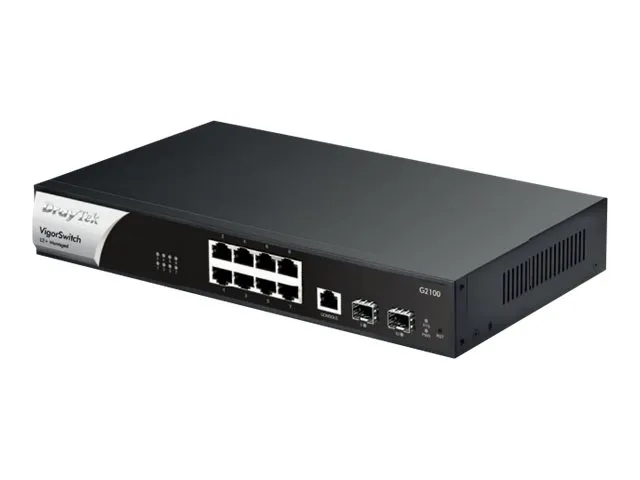
8-Port Gigabit Layer 2+ Managed Switch with 2 SFP Uplink Ports
The VigorSwitch G2100 is a high-performance, Layer 2+ Managed Ethernet switch. With 8 RJ-45 Gigabit LAN ports, it's ideal for adding network ports to a DrayTek Vigor router. The enterprise-level features allow your business to improve network stability and security.
The VigorSwitch G2100 works superbly in standalone mode, but designed for centralised management, it can be provisioned and monitored by one of DrayTek’s central management platforms. These include the VigorACS management platform, VigorConnect on-site management and DrayTek’s router-based switch management These platforms allow you to drastically reduce the setup time required for a complex network and configure an entire DrayTek network remotely.
Central Switch Management with a DrayTek Vigor Router
DrayTek Vigor router Central Switch Management provisions and monitors VigorSwitch switches through a DrayTek Vigor router, with profiles that can be applied to multiple switches and VLAN configuration all handled within the router.
Central Switch Management requires firmware support on both the VigorSwitch and the DrayTek Vigor router*
*requires 3.9.1 firmware update
This can simplify the setup of multiple subnets and VLANs, without needing in-depth knowledge of VLAN tagging and reduces setup time, with the time consuming step of configuring VLANs for each port handled by the router instead.
Dynamic MAC-based VLAN
Assign VLAN access to individual devices instead of ports with MAC-based VLAN, to ensure that devices are assigned to the correct network regardless of which switch port they're plugged into.
With MAC-based VLAN, users can move around the office and make use of the same network resources and access through any port on the switch, without requiring manual re-configuration of VLAN settings on individual ports.
Surveillance & Voice Auto VLAN
Auto Voice and Surveillance VLAN
With Voice VLAN and Surveillance VLAN, the VigorSwith P1085 simplifies the setup of connected IP Phones and IP Cameras. Move around ports on the switch without having to manually re-configure VLAN and QoS settings each time, instead the switch will auto-assign VLAN tags and Quality of Service to IP Phones and IP Cameras, ensuring that each device remains on the correct network and that essential Voice and Video data is prioritised on the network.
The switch identifies cameras and phones from their MAC address (Vendor OUI), so that when connecting up an IP Phone from Yealink for instance, the switch would configure the VLAN ID and set the QoS tag for that port. Moving the phone to a different port, the switch will ensure that the VLAN settings follow the device rather than requiring a fixed VLAN & QoS configuration per-port.
Advanced Layer 2+ Routing Features
The VigorSwitch G2100 includes Layer 3 features; VLAN Routing, DHCP Server and Static Route, which allow the switch to provide routing between VLANs at full speed. The switch's Access Control List gives full control of what traffic routes between those networks.
ONVIF IP Camera Management
The VigorSwitch G2100 can discover, manage and configure ONVIF (Open Network Video Interface Forum) compatible IP cameras and NVR systems, allowing for easy discovery, management and troubleshooting of your connected IP cameras.
Device Management
Use the VigorSwitch to configure and manage your IP camera network; configure network & security settings, restart cameras and have the switch monitor whether cameras are responding, alerting of any issues.
Network Surveillance Topology
Simply connect ONVIF capable devices to the VigorSwitch G2100, Discover devices and the VigorSwitch determines the network topology of connected cameras & NVR systems.
Camera Offline Alerts with Snapshot
The VigorSwitch G2100 can store a recent snapshot of each connected IP Camera that's ONVIF compliant.
If a camera goes offline, the VigorSwitch sends out an Email alert with the last-seen snapshot from the camera that's stopped responding. Allowing you to locate the affected camera easily and troubleshoot any problems it may have, such as a disconnected cable or faulty camera.
In addition, with Device Check on a PoE VigorSwitch, the switch can automatically power cycle the affected camera when problems occur, resolving issues with a freezing camera without requiring manual intervention.
IP Conflict Detection & Prevention
Conflict Detection
The VigorSwitch can detect and notify an administrator when an IP conflict is detected on the network. Easily track down conflicts and take action to resolve them.
Conflict Prevention
Use DrayTek's IP Conflict Prevention to allow the switch to automatically protect against IP conflicts and ARP spoofing.
IP Conflict Prevention catalogues the current network layout, giving you the option to fix the IP address and MAC information for important network devices, such as Servers and Routers.
If another device attempts to use an IP address that's in use, the VigorSwitch blocks the misconfigured or malicious device, communicating only with the known and correct device.
Quality of Service & Bandwidth Control
Quality of Service
Prioritise mission-critical services such as Voice over IP and optimise traffic on your network with Quality of Service. 802.1p Class of Service allows the switch to identify essential traffic, moving it ahead in the queue at busy uplinks, ensuring that important data arrives on time when passing through the switch.
Auto Voice & Surveillance VLAN allow the switch to automatically assign VoIP Phones and IP Cameras to their specified VLAN and prioritise their traffic without manual port configuration.
Control and manage throughput per-port with Rate Limiting and application specific Traffic Shaping.
Network Security and Management Features
Stay in control of what's connected to your network with Port Security and 802.1X & MAC authentication, to prevent connection of unauthorised equipment.
Protect against network issues arising from connection of unwanted devices with DHCP Snooping and IP Source Guard.
Control port access for every port on your network with the VigorSwitch Access Control List - to specifically allow or deny specified traffic types moving between ports, just like a Firewall.
Product details
30
| Access Control List (ACL) IPv4 entries | 512 |
|---|---|
| AC input voltage | 100 - 240 V |
| Authentication | MAC-based authentication |
| Authentication type | AAA |
| Basic switching RJ-45 Ethernet ports quantity | 8 |
| Basic switching RJ-45 Ethernet ports type | Gigabit Ethernet (10/100/1000) |
| Cables included | AC |
| Copper ethernet cabling technology | 10BASE-T, 100BASE-T, 1000BASE-LX |
| Depth | 181 mm |
| DHCP features | DHCP client, DHCP server, DHCP snooping |
| Form factor | 1U |
| Forwarding rate | 14.88 Mpps |
| Harmonized System (HS) code | 85176990 |
| Height | 44 mm |
| Jumbo frames | 9000 |
| Multicast MAC address table | 256 entries |
| Networking standards | IEEE 802.1D, IEEE 802.1Q, IEEE 802.1ab, IEEE 802.1ad, IEEE 802.1p, IEEE 802.1s, IEEE 802.1w, IEEE 802.1x, IEEE 802.3, IEEE 802.3ab, IEEE 802.3ad, IEEE 802.3az, IEEE 802.3u, IEEE 802.3x |
| Operating relative humidity (H-H) | 5 - 90% |
| Operating temperature (T-T) | 0 - 50 °C |
| Packet buffer memory | 4.1 MB |
| Power consumption (max) | 18 W |
| Product colour | Black |
| SFP module slots quantity | 2 |
| Storage temperature (T-T) | -20 - 70 °C |
| Switching capacity | 20 Gbit/s |
| Switch layer | L2+ |
| Switch type | Managed |
| Virtual LAN features | MAC address-based VLAN, Port-based VLAN |
| Weight | 1.78 kg |
| Width | 270 mm |
Logistics
| EAN | 4710484742964 |
|---|---|
| Unit of measure | — |
| Weight | — |
| Dimensions | — |
| Dangerous goods | No |
Warranty
- 12-month warranty on everything we sell.
- Runs from the day your order is delivered.
- Faults under normal use are repaired, replaced or refunded.
Payment
- Visa and Mastercard, processed securely by Tyl by NatWest with 3D Secure.
- PayPal — your PayPal balance or a saved card or bank account.
- Clearpay, Klarna and Billie — pay later or in instalments, processed by Stripe.
- No surcharge on any payment method; refunds go back to the way you paid.
Spread the cost


-
-
- Businesses: pay in 30 days on invoice with Billie. Learn more
Choose at checkout. 18+, T&Cs apply, credit subject to status.
You might also like