Roll over image to zoom in · Click to see full view
Product information
From the manufacturer
About this product
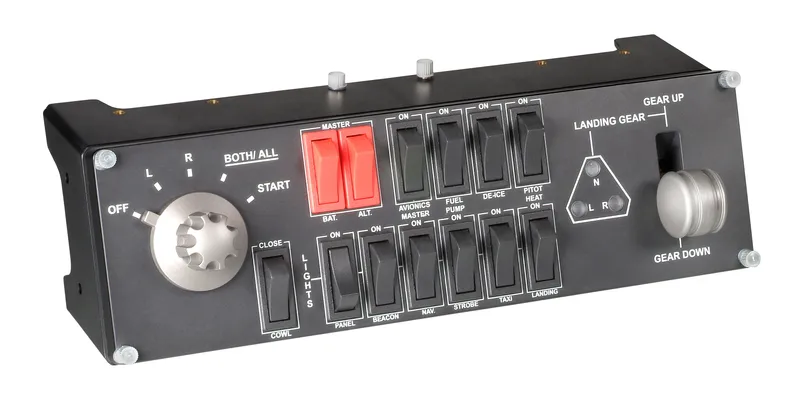
- Multiple in-cockpit controls give you the next step to replicating the functionality of an actual aircraft in your flight simulation setup.
- Realistic landing gear control with LED indicators – nothing beats the satisfying click of an actual control lever. And with LED indication of any potential faults with your aircraft, you’ll know if it’s safe to touch down
- The 5-position magneto dial ignites engines so that, just as with the landing gear lever, you turn a dial like the one in a real aircraft to start your engines and get your flight under way.
- Modular and interchangeable, Saitek's range of instrument panels can be stacked one on top of another or placed side by side in your preferred configuration. Upgrade your cockpit one piece at a time until you have every instrument display that you need for your virtual aircraft of choice.
Saitek's Pro Flight Switch Panel is ideal for expanding the number of controls in your flight simulator setup. Attach it to your Saitek Pro Flight Yoke, place it atop your desk, or even mount it to your own custom cockpit setup. Control your landing gear and lights, engine power and other important aircraft functions, all from one compact unit.
Modular and interchangeable, Saitek's range of Instrument Panels can be situated one on top of another or side-by-side. Want the Multi Panel above the Radio Panel? Done. Want your Switch Panel to the left of your Yoke? Go for it. Easy-to-use mounting brackets provide the means to arrange your flight simulation setup in a configuration only limited by your imagination.
Product details
21
| Connectivity technology | Wired |
|---|---|
| Depth | 105 mm |
| Device interface | USB |
| Device type | Flight Sim |
| Gaming control technology | Analogue / Digital |
| Gaming platforms supported | PC |
| Harmonized System (HS) code | 95049080 |
| Height | 95 mm |
| Master (outer) case gross weight | 4 kg |
| Master (outer) case height | 262 mm |
| Master (outer) case length | 338 mm |
| Master (outer) case width | 309 mm |
| Minimum system requirements | Windows 7, Windows 8, Windows 8.1 and Windows 10 |
| Package depth | 321 mm |
| Package height | 119 mm |
| Package weight | 918 g |
| Package width | 144 mm |
| Power source | Cable |
| Product colour | Black |
| Weight | 500 g |
| Width | 285 mm |
Logistics
| EAN | 5099206069855 |
|---|---|
| Unit of measure | — |
| Weight | — |
| Dimensions | — |
| Dangerous goods | No |
Warranty
- 12-month warranty on everything we sell.
- Runs from the day your order is delivered.
- Faults under normal use are repaired, replaced or refunded.
Payment
- Visa and Mastercard, processed securely by Tyl by NatWest with 3D Secure.
- PayPal — your PayPal balance or a saved card or bank account.
- Clearpay, Klarna and Billie — pay later or in instalments, processed by Stripe.
- No surcharge on any payment method; refunds go back to the way you paid.
Spread the cost


-
-
- Businesses: pay in 30 days on invoice with Billie. Learn more
Choose at checkout. 18+, T&Cs apply, credit subject to status.
You might also like

Recently viewed