Roll over image to zoom in · Click to see full view

| Cooling type | Passive |
|---|---|
| Data transfer rate (max) | 32 Gbit/s |
| Depth | 68.9 mm |
| Expansion card form factor | Low-profile |
| Expansion card standard | PCIe 3.0 |
| External mini-SAS ports | 2 |
About this item
The QXP SATA expansion cards are designed for QNAP’s TL series JBOD storage enclosures that support SATA drives. Expand storage capacity easily by installing a QXP SATA expansion card into the PCIe slot of a QNAP NAS or Windows/ Ubuntu (Linux) PC, and then connect the TL series JBOD storage enclosures using an...
View full product descriptionProduct information
From the manufacturer
About this product
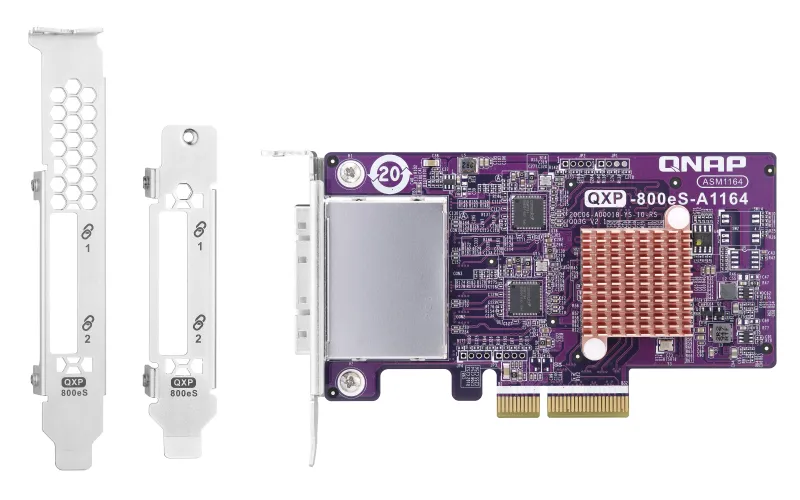
The QXP SATA expansion cards are designed for QNAP’s TL series JBOD storage enclosures that support SATA drives. Expand storage capacity easily by installing a QXP SATA expansion card into the PCIe slot of a QNAP NAS or Windows/ Ubuntu (Linux) PC, and then connect the TL series JBOD storage enclosures using an SFF-8088 (or SFF-8644) cable. The low-profile card form-factor allows QXP SATA expansion cards to be compatible with a wide variety of NAS, computers, and servers.
Supports QNAP NAS and Windows/Ubuntu PCs
Each SFF-8088 or SFF-8644 (internal) connector on the QXP SATA expansion card supports up to four SATA drives. A suitable QXP card can be installed based on the number of drives you want to connect for storage expansion. For example, a NAS or PC can have two 4-port QXP-400eS cards installed, with one card connected to a 4-bay tower TL-D400S JBOD enclosure and the other card connected to a 4-bay rackmount TL-R400S. Alternatively, both cards can be connected to a single 8-bay tower TL-D800S JBOD enclosure. A NAS or PC with a single QXP-400eS card installed can also connect to an 8-bay TL JBOD storage enclosure that has only 1-4 drives installed.
Hard to find SAS Expansion Cards? Try QXP SATA Expansion Cards!
When connecting Windows and Ubuntu (Linux) hosts to SAS JBOD for expanding storage capacity, enterprises often choose SATA drives because there are few SAS expansion cards on the market. QXP SATA expansion cards not only support QNAP TL SATA JBOD and QNAP SAS JBOD (EJ series, REXP series) but also third-party SAS JBOD. You can easily expand the storage capacity of a server/host by installing a QXP SATA expansion card and connecting the SAS JBOD using an SFF-8088 (or SFF-8644) cable with Windows and Ubuntu (Linux) PCs software RAID configuration.
QNAP JBOD Manager for Windows/Ubuntu users
The QNAP JBOD Manager utility allows Windows and Ubuntu (Linux) PC users to monitor the status of fans, system temperature, and drive information of TL series JBOD storage enclosures.
Product details
18
| Cooling type | Passive |
|---|---|
| Data transfer rate (max) | 32 Gbit/s |
| Depth | 68.9 mm |
| Expansion card form factor | Low-profile |
| Expansion card standard | PCIe 3.0 |
| External mini-SAS ports | 2 |
| Harmonized System (HS) code | 84733020 |
| Height | 17.2 mm |
| Host interface | PCIe |
| Internal | Yes |
| Linux operating systems supported | Yes |
| Output interface | Mini-SAS |
| Product colour | Blue |
| Purpose | NAS / Storage server |
| Quantity | 1 |
| Server operating systems supported | Windows Server 2012 R2, Windows Server 2016, Windows Server 2019 |
| Width | 119.7 mm |
| Windows operating systems supported | Windows 10, Windows 7, Windows 8, Windows 8.1 |
Logistics
| EAN | 4713213517765 |
|---|---|
| Unit of measure | — |
| Weight | — |
| Dimensions | — |
| Dangerous goods | No |
Warranty
- 12-month warranty on everything we sell.
- Runs from the day your order is delivered.
- Faults under normal use are repaired, replaced or refunded.
Payment
- Visa and Mastercard, processed securely by Tyl by NatWest with 3D Secure.
- PayPal — your PayPal balance or a saved card or bank account.
- Clearpay, Klarna and Billie — pay later or in instalments, processed by Stripe.
- No surcharge on any payment method; refunds go back to the way you paid.
Spread the cost


-
-
- Businesses: pay in 30 days on invoice with Billie. Learn more
Choose at checkout. 18+, T&Cs apply, credit subject to status.
You might also like
Recently viewed